Saturday, February 14, 2009

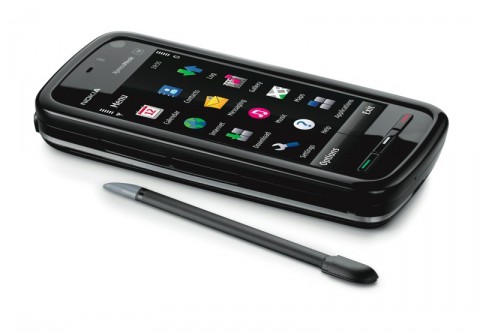
Nokia 5800, the smartphone for music.

I’ve just changed my mobile phone contract and was recommended the new Nokia 5800 Xpress Music phone so I thought I’d give it a try.

For the past 3 or 4 years I’ve been using Windows Mobile based phones made by HTC, most recently the HTC Tytn II so I’m used to a touch screen smart phone.

I plan to do a series of blog posts about the 5800 and how it compares to Windows Mobile phones over the next few weeks but are my first impressions after using it for a couple of days.

Look and feel

The 5800 is slightly smaller in all dimensions than the Tytn II and quite a bit lighter so it’s looking good so far, it looks much more like a conventional mobile phone than the HTC phones.

I was a little worried about only have 3 front keys on the Nokia compared to the 13 keys on the HTC but as I will explain later this doesn’t turn out to be a problem.

The phone feels fairly sturdy and solid. the back cover unclips rather than slides which could be a problem longer term if the clips break but we’ll have to see how that goes in real world use.

The screen

The 5800’s screen has a widescreen aspect ratio which is slightly smaller in height than the Tytn but much wider which I think is a good thing as more and more content is being produced in widescreen now. The screen looks brighter on the Nokia than what I’m used to with the HTC which should help when summer finally comes.

To the touch

The touchscreen has always annoyed me on the HTC finding it unresponsive and fiddly. I’m happy to say that I’ve found the touchscreen on the Nokia much better. the scrolling works well without accidentally clicking on something and most of the on screen buttons are large enough to be easily tapped without the stylus even with my bulky man-fingers. This mostly negates the my thoughts about the lack of keys.

I’m getting some false clicks with the on screen keyboard but this might take some practice so I’ll comment more on that in a later post.

A stylus is included for more fine control but so far I haven’t needed it much yet.

Initial conclusion

After only 2 days of use I’m pleased with the Nokia 5800 and find it much more responsive than the HTC Tytn II, I’ll post more about specific aspects of the phone over the next few days and weeks.

Saturday, February 07, 2009

Gladinet makes Sky Drive easy

A couple of days ago I told you about Windows Live Sky Drive and how I was using it for a back up solution.

image

One of the draw backs with Sky Drive is that the web interface can be a little sluggish, but I’ve recently been trying out an application that does away with the web interface altogether.

Gladinet sits running in the background on your PC and creates a virtual network drive called ‘resources Z:’ and creates folders on this drive that maps your Sky Drive account or accounts with Google Picasa, Google Docs, ADrive or Amazon Storage. I’ve only tried it with Sky Drive but it's made life so much easier.image

You just drag and drop into this folder and the files are uploaded onto Sky Drive in the background. It works just like an ordinary drive on your PC or network so you can also drag and drop files from the Sky Drive onto you local computer just as easily.

I’ve installed Gladinet onto my main desktop PC and my notebook and each PC can access the Sky Drive from ‘My Computer’ with Drag and Drop.

So far I’m really pleased with Gladinet with the one little fly in the ointment. When uploading or downloading a large group of files it will use all of the network bandwidth it can get hold of to make the process as quick as possible. This can make other internet applications sluggish while Gladinet does the transfer. I would like to see a bandwidth limiter built into Gladinet so that it can be set to limit how much of your internet pipe it uses.

Gladinet is in Beta at the moment so lots can change and there may be a few little bugs that need ironing out but I’ve found it very stable so far. You can learn more about Gladinet and download it at http://www.gladinet.com/

Thursday, February 05, 2009

Windows Live Sky Drive

Over the last few days, I’ve been trying out Microsoft's Windows Live service. Its a range of web apps a bit like Google are doing with Googlemail and Googledocs.

The first of these I’ve tried is Sky Drive.

What is Sky Drive?

Sky Drive is a virtual hard drive up on Microsoft’s servers for you to store anything you want. Initially, you are given 25GB of space but I understand that this increases when you start to fill it up. 25GB should be plenty for most people though, if my maths is right that’s about 5000 photos taken with a 12megapixel camera.

What can it be used for?

Well you can store anything there so the sky really is the limit. I’m using it as an offsite back up, so if something really bad happens like a fire or flood, all of my stuff is stored somewhere else in the world so I can get it back. Being a musician I have a lot of audio files recorded in my home studio and lots of other music related data files so I can go back and edit or remix songs that we have produced. I’m gradually putting these files up onto Sky Drive so if something happened to my studio I can download the files I want when I’m back in action.

image

Another use for Sky Drive is for syncing files between PC’s. Say you have important files stored on your desktop PC. You can have a copy of them on Sky Drive so that if you’re away and need say a Powerpoint presentation on your laptop you can get the file from Sky Drive.

Microsoft’s Facebook

Windows Live also has social networking features similar to Facebook, using this you can set up folders on Sky Drive that can be shared with your contacts on Live. You have complete control over who can see which folders on your drive and if you give some of your contacts permission, they can upload or download to your folder securely.

The Gotchas

One of the drawbacks is our UK broadband connections are really slow compared to other parts of the world so backing up does take a really long time.

Also, you need to check if your internet service provider places a limit on how much data you can transfer in a month. My account on Plus.net gives me 15GB of usage per month but overnight they don’t measure my usage so I set the backups to happen when they are not measuring my usage.

Try it

You can try Sky Drive by going to home.live.com and logging in with your Microsoft login if you have one. If you don’t yet have a Microsoft login, you can create one for free at the site. The service is totally free, supported by small adverts placed on your control panel

Tuesday, February 03, 2009

I've had this blog for a few years and never really used it much as I was always far to busy with work and family.

Anyway, I've lost my retail business in the economic collapse and am now just doing stuff from home till I find a job so I thought I might start the blog up again. I haven't been here for a while and a lot has changed at Blogger in the last 3 years so it will probably take me a while to get the hang of it.

My aim for the restarted blog is just to post anything that I feel like writing. It might be my views on a new gadget, piece of software or just something I want to get off my chest.

If you don't agree with what I have to say just leave a comment on the post to let others know.

Andrew
